
Delta Executor Download (Latest Version 2026)
Don’t know where to start? Click the below button
Latest Version: 2.727.1199
Last Updated: 7th July 2026
Tested With Roblox Version: Latest Stable Release
What’s New in This Update
- Updated to 2.727.1199
- Still Undetected
- Added setstackhidden
- Added isnewcclosure
- Fixes to asset loading
- Hooking improvements
- Fixed getrawmetatable hooks
- Bug Fixes
Status: Working & Stable
✔ Tested, verified, and reported malware-free by users
Is Delta Executor Safe?
Yes. Delta Executor is tested, lightweight, and reported malware-free by users. It’s safe to install on Android, Windows, and iOS devices when downloaded from official sources. Always keep your device updated and follow the installation instructions. Read more about Safety considerations for Delta Executor
View the VirusTotal scan results here – 0/90+ detections (completely clean)
Introduction
Delta Executor is a Roblox script executor that allows users to run Lua scripts on supported platforms such as Android, iOS, and PC. It is commonly used for automation, gameplay enhancements, and script execution in Roblox games. This page provides a complete explanation of Delta Executor, including how it works, supported devices, key system, safety considerations, and official download guides.
40M+
Download
500K+
Discord members
500M
Times launched
Key Features of Delta Executor
Premium Features
Delta provides a premium experience with lots of ultra amazing features.
Swift Updates
Unlike other executors, you don’t have to wait ages for updates. Delta provides blazing-fast updates.
24×7 Support
Need help? We are always ready to help you get your Delta exploit up and running.

What is A Delta Executor?
Delta Executor is a third-party Roblox executor designed to inject and run Lua-based scripts inside Roblox games. It functions by attaching itself to the Roblox client and executing scripts that modify gameplay behavior, such as automation, farming, or UI enhancements. Delta Executor is primarily used by advanced Roblox players who understand script-based tools and execution environments.
How Delta Executor Works?
Delta Executor works by injecting a script execution engine into the Roblox runtime environment. Once attached, it allows users to load external or built-in scripts and execute them in real time. The executor uses a key-based authentication system to control access and manage usage after Roblox updates.
What are the supported platforms for Delta Executor?
Delta Executor for Android
The Android version is distributed as an APK file and runs directly on supported Android devices. Users must enable installation from unknown sources and complete a key verification process before script execution. Check out Delta Executor Android Download & Setup Guide
Delta Executor for iOS
The iOS version of Delta Executor requires sideloading or certificate-based installation methods. Installation steps differ from Android due to Apple’s security restrictions, and compatibility depends on the iOS version and device model. Check out Delta Executor iOS Download & Installation
Delta Executor for PC
Delta Executor can be used on PC through Android emulators. This method is suitable for users who do not own compatible mobile devices but want to run mobile-based executors on Windows systems. Check out Delta Executor PC Setup Guide
What are the Essential Requirements for Downloading Delta Executor on Android?
The official Delta Executor Android APK is lightweight and optimized. Powered by the Gloop Engine, it does not require a high-end device. However, to ensure smooth Lua script execution and stable access to all premium features, your device should meet the minimum requirements listed below.
Quick Compatibility Checklist:
| 🧩 Requirement | 💻 Minimum Specification | 🎯 Why It Matters |
|---|---|---|
| Operating System | Android 6.0 (Marshmallow) or higher | Ensures compatibility with modern APIs and secure execution layers. |
| Processor | Octa-Core (1.6 GHz+) | Required for the Gloop engine and complex Roblox script execution. |
| RAM | 4 GB RAM or more | Prevents crashes while running Roblox and Delta Executor simultaneously. |
| Internet Speed | Stable 4G or better (4–8 Mb/s) | Needed for fast script injection and real-time anti-cheat updates. |
| Storage Space | 200 MB free space | Required for the APK file and local Script Hub data. |
| Permissions | Install from Unknown Sources | Standard requirement for APK sideloading and safe manual installation. |
Delta Executor Key System Explained
Delta Executor uses a temporary key system to manage access and prevent automated misuse. Users must obtain a valid key through the official verification process before scripts can be executed. Keys usually expire after a set period and must be regenerated to continue using the executor.
👉 How to Get and Use the Delta Executor Key
How to Download Delta Executor?
Downloading the Delta executor is very easy and straightforward. Just follow the procedure below and start downloading Delta in your Android or iOs device.
- First things first, visit the official Delta website, deltaexectr.com.
- Then scroll down to the ‘Download‘ button.
- Click on the ‘Download‘ button, and you will be redirected to the new download page.
- Now you will see the Delta executor download section.
- Click on the ‘Download Delta’ button.
- Now the Delta file will automatically start downloading in your device.
- Once downloaded, tap open and install the APK file.
- Open the Roblox game that you just installed and start playing.
What are the steps To Run Roblox Scripts Using Delta Executor?
Running Roblox scripts using Delta executor is very easy; all you need to do is follow our guide below step by step. All the other guides available on the internet are outdated and incomplete. Please read our guide below to run scripts using Delta.
- Assuming you have already installed the Delta executor on your device.
- Now, open the Delta by clicking on the Roblox icon (Which is Delta)
- Search for your desired Roblox game and hit the Play button
- When the game is fully loaded, you will see the executor’s window.
- Now, click on the ‘Controller’ icon on the right side.
- You will need to paste your favorite script into the script box.
- Once done, your script will be executed in the game.
How to Get Delta Mobile Executor Key?
The Delta executor has key-based access; you need to complete a few steps to obtain the Delta key from a third-party website. Since lots of players are finding it difficult to get the key, we have written this guide.
Assuming you have already installed the Delta exploit in your device, it’s time to get the key. Follow the steps written below:
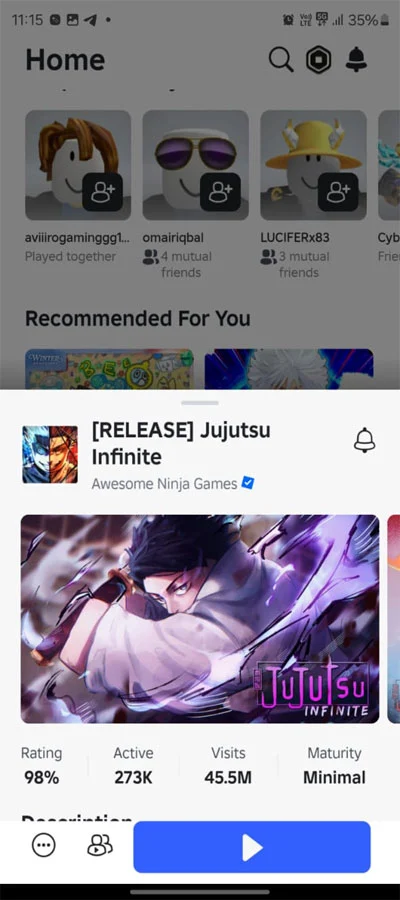
Step 1: Launch Delta executor and tap Play on the desired game.
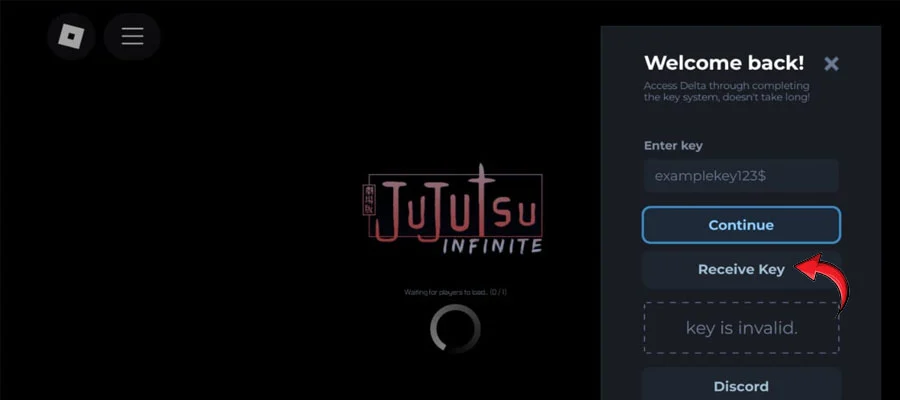
Step 2: Once the game is loaded, you will see the Delta window. Tap on Receive Key, and the link will be copied to the clipboard.
Step 3: Now open your favorite browser and paste the URL that was copied to the clipboard.
Step 4: Now complete all the steps that were prompted. You need to complete at least 3 checklists before you get the key.
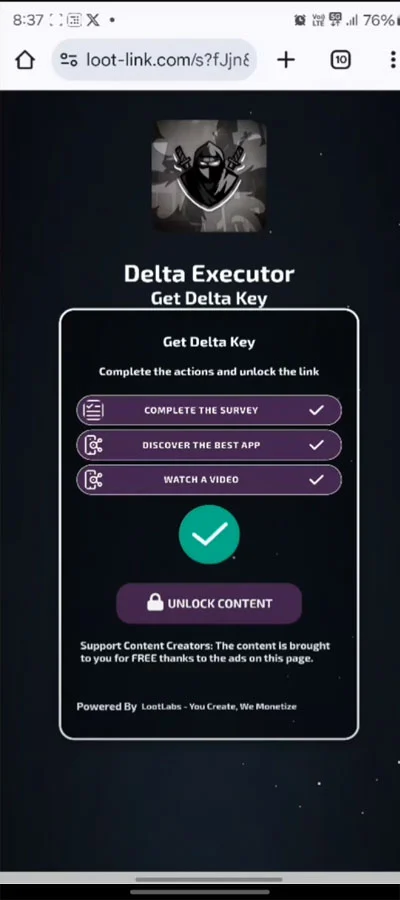
Step 5: After completing all the checklist, you will receive your key. Copy the key and get back to the Delta window.
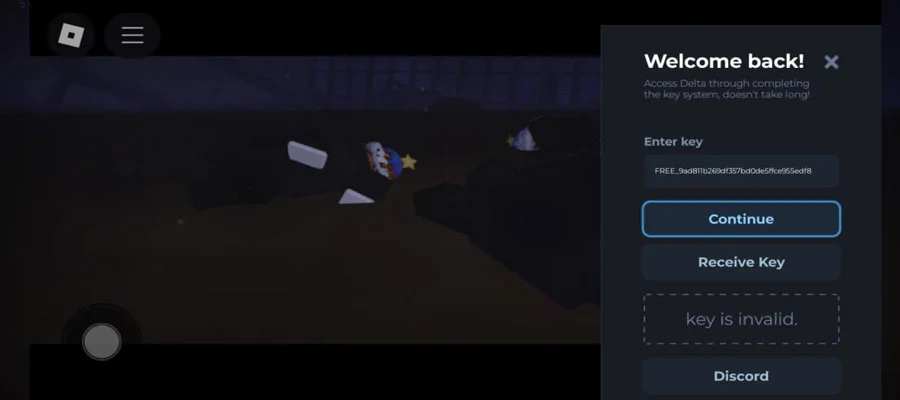
Step 6: Paste the key in the Enter Key column and hit Continue.
Why Delta Executor is the Best Executor for Roblox?
You get the best with Delta. When you download it, you’re getting top-quality stuff that our competitors just can’t beat in terms of build quality and support. The latest version of Delta Executor isn’t ordinary software — it’s a powerful tool made for dedicated Roblox players.
Here are 15 unique features that make Delta X 2.0 the strongest executor out there, which is why it has over 950 million total downloads:
Gloop Execution Engine
A powerful custom engine that runs Lua scripts with zero lag using advanced low-level techniques. Enjoy fast and stable performance for instant in-game actions.
100% UNC Support
Complete stability with no crashes during script injection. Play smoothly and reliably every time.
Built-in Script Hub
No need to search elsewhere. Comes with a huge library of ready-to-use, tested, and optimized scripts for the latest Roblox version.
True Cross-Platform Support
Full-featured version for both Android (APK) and Windows PC. Get the same great experience on any device.
Simple Key System
Get your key quickly and easily — no annoying endless steps or checkpoints like other executors.
Advanced Anti-Ban Protection
Constant updates and smart bypass methods keep you safe from even the strongest Roblox detection systems.
Fast Update Compatibility
We release updates within hours of any major Roblox patch so you never get left behind.
Clean & Easy Interface
Simple, organized design that works perfectly on touchscreens and desktop. Run scripts with just a couple of taps.
Controller Status Icon
A clear icon shows when the executor is properly attached and ready on mobile devices.
Automatic Updates
The installer and app update themselves — no manual downloads needed for new versions.
Secure Execution
All files are checked, and advanced encryption keeps your device and Roblox account safe.
Dedicated Discord Support
Join our large community (over 1.4 million members) for instant help, tickets, and advice.
Easy File Management
Load your own custom Lua scripts quickly using the built-in file browser.
Optimized for Low RAM
Runs smoothly on Android devices with 4GB RAM or less, even with heavy scripts.
Delta Executor vs The Rest: Why We Outperform Competitors?
Delta Executor consistently beats Hydrogen’s Executor, Arceus X Neo, Fluxus, and others in reliability, speed, and surviving major Roblox anti-cheat updates.
| ⚙️ Feature | 💚 Delta Executor | ⚡ Hydrogen’s Executor | 🔥 Arceus X Neo | 💠 Fluxus Executor |
|---|---|---|---|---|
| Execution Engine | Gloop (C++ based) | Proprietary / Mixed | Arceus X (often crashy) | KRNL-based |
| Mobile Stability | Industry-Leading (Dedicated APK) | High, but often requires re-install | Low (Frequent crashes) | Moderate (Patch reliant) |
| Update Speed (Post-Roblox Patch) | Rapid (Hours/1 Day) | Slow (Multiple Days) | Very Slow (Often Weeks) | Medium (2–3 Days) |
| Built-in Script Hub | Yes, Massive & Curated | Yes, slower updates | Small / Manual links | Medium size |
| Keysystem Ease | Simple (Easy Bypass Method) | Complex (Multiple checkpoints) | Very Complex / Ad-heavy | Moderate |
| Safety Record | Excellent (Official Builds Only) | Good, but fakes are rampant | Poor (History of malware warnings) | Good |
Delta Executor focuses on mobile optimization and stable performance with the Gloop engine. Competitors often struggle with crashes, memory leaks, and slow update times after Roblox patches. Choose Delta for consistent reliability and speed.
What are the Pros and Cons of Delta Executor?
Delta Executor is the best Roblox executor available, but like any tool, it comes with trade-offs. Here’s a clear view of the pros and cons:
✅ Pros
- Unbeatable Stability: Reliable 100% UNC support script execution with minimal crashes.
- Ultimate Mobile Experience: Dedicated APK makes running scripts on Android fast and easy.
- Scripts Included: Instant access to the massive built-in Script Hub, updated and ready.
- Quick Update Response: Rapid release after Roblox anti-cheat patches.
- Simplified Key System: Easy bypass method for smooth activation on Android.
❌ Cons
- Risk of Account Ban: Exploiting Roblox can result in detection.
- Antivirus False Positives: Some security software may incorrectly flag the installer.
- Keysystem Process: Activation key required every 24 hours.
- Mobile Permissions: Temporary allow unknown sources to install APK.
- No Guarantee Against Future Patches: Roblox evolves constantly; no 100% guarantee of future compatibility.